♦ 🐆 3 min, 🐌 6 min
python virtual environments with venv
Python 3.? introduced the venv package into the standard library. This allows us to ditch the use of other extra libraries like virtualenvironment, virtualenvwrapper, ... and stick with what the python installation provides out of the box. So don't use all the crappy libraries and end up with (As Xkcd shows):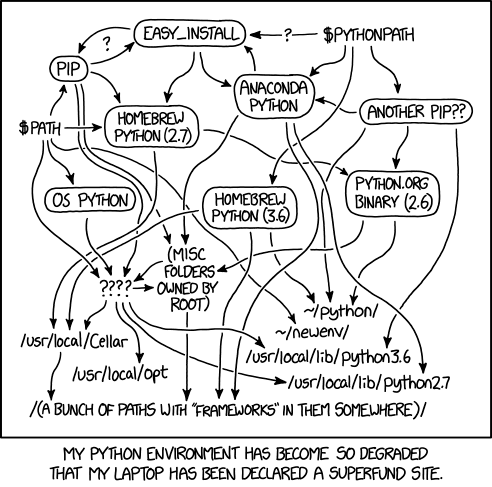
venv and live a happy simple life. Stay away from anaconda and all that crap.Although pip/pip3 is still a third party package it's used widly throughout the python ecosystem. No if you don't want to use it you can use python setup.py install. But for that you still need setuptools so ... I guess we can't get rid of all dependencies just yet 🙁 Sure you can bypass even pip and setuptools. With custom/small private projects this might not be an issue. With the rest of the packages like numpy, scipy, ... I'm not sure it's worth the hassle.Instructions below should work on POSIX complient OS (macOS and Linux). For Windows consult the official docs:Creating virtual environment
We'll place all of our virtual enviroments to~/venv so we create a folder:mkdir ~/venv
ENV_NAME="ML_tools"
python3 -m venv "~/venv/$ENV_NAME"
source "~/venv/$ENV_name/bin/activate"
> ... to (ML_tools) > .... This indicates that we are in a venv.Once you are in the virtual environment you can check which python or virtual environment you are using with:> which python
~/venv/ML_tools/bin/python
deactivate.Installing packages
Inside the virtual environment we don't have to specify version of python since only one is avaliable. If environment is completly new you might want to upgrade thepip version you are using via:pip install --upgrade pip
python3 we can install packages inside the virtual environment with:pip install numpy
requirements.txt simply run:pip install -r requirements.txt
requirements.txt containing:numpy
matplotlib
scipy
tqdm
scikit-learn
torch
torchvision
venv the process of installind requirements, running commads is the same as anywhere in the python ecosystem.Cross check that all dependencies are avalibale
I recently found a code snippet that you can use to cross check if all dependencies are installed.Then to use it:> python check_requirements.py ./ML-tools/requirements.txt
numpy : INSTALLED
matplotlib : INSTALLED
scipy : INSTALLED
> python check_requirements.py numpy requests
numpy    : INSTALLED
requests : MISSING
import importlib
import sys

lib_aliases = {
    "scikit-learn": "sklearn"
}


def colored_text(color, text):
    colors = {
        "green": '\033[1;32m%s\033[m',
        "yellow": '\033[1;33m%s\033[m',
        "red": '\033[1;31m%s\033[m'
    }
    return colors[color] % text


def is_lib_installed(lib_name):
    try:
        # check if lib import and lib name from requirements file might differ
        lib_name = lib_aliases[lib_name] if lib_name in lib_aliases.keys() else lib_name

        importlib.import_module(lib_name)
        return True
    except ModuleNotFoundError:
        return False


def main(list_of_libs):
    lib_lengths = [len(lib) for lib in list_of_libs]
    max_length = max(lib_lengths)

    for lib_name in list_of_libs:

        if is_lib_installed(lib_name):
            print(f"{lib_name: <{max_length}} : " + colored_text("green", "INSTALLED"))
        else:
            print(f"{lib_name: <{max_length}} : " + colored_text("red", "MISSING"))

    # todo: list the rest of the libraries installed in the environment


def load_list_of_requirement_libraries(file_name):
    try:
        with open(file_name, 'r') as data_file:
            file_content = data_file.read()

        libs = file_content.split("\n")
        return libs

    except FileNotFoundError:
        print(colored_text("red", f"{file_name} file not found"))
        sys.exit()


if __name__ == "__main__":

    # use with: python check_requirements.py
    if len(sys.argv) == 2 and "requirements.txt" in sys.argv[1]:
        file_name = sys.argv[1]

        list_of_requirement_libs = load_list_of_requirement_libraries(file_name)

    # use with: python check_requirements.py numpy requests
    else:
        list_of_requirement_libs = sys.argv[1:]

    if len(list_of_requirement_libs) != 0:
        main(list_of_libs=list_of_requirement_libs)
    else:
        print(colored_text("red", "No libraries supplied"))
Extending venv builder
When we run python3 -m venv path we are essentialy using the EnvBuilder class implemented in standard. When we create the virtual envirommnet with venv command pip and setuptools that are used for instalation of most packages aren't installed by default.For more details on EvenBuilder check the Source code of EnvBuilder and an example how to extend the environment builder to also install pip and setuptool How to extend the EnvBuilder .But in principle if you installed the python3 version with homebrew (macOS) or with on of the fancy linux package managers the pip and setuptool should be at your disposal already.
Get notified & read regularly 👇