♦ 🐆 1 min, 🐌 3 min
Append to file from multiple python scripts in parallel
Occasionally we need to append from multiple concurrently running programs to the same file.For example. Our server is running multiple workers. Each of the workers wants to append data to the same file. python has a built in command to append to a file:with open("test_file.txt", "a") as file:
file.write(new_line)
a option we append to the end of the file. Using a is not the same as opening with w and seeking the end of the file. While opening the file and seeking the end of it another program could write to our file. So we want to append to our test_file.txt.On some operating systems, opening the file with a guarantees that all your following writes will be appended atomically to the end of the file (even as the file grows by other writes).Let's test this. We want to run two python scripts in parallel to see if both will write data to the file:We write script user_a.py:from datetime import datetime
import time
if __name__ == "__main__":
for i in range(10):
time.sleep(1.0)
current_time = datetime.now()
output = f"a {current_time}\n"
with open("test_file.txt", "a") as file:
file.write(output)
user_b.py:from datetime import datetime
import time
if __name__ == "__main__":
for i in range(10):
time.sleep(1)
current_time = datetime.now()
output = f"b {current_time}\n"
with open("test_file.txt", "a") as file:
file.write(output)
test_file.txt. Then open three terminal windows at the same location. In one we'll run the:tail -f test_file.txt
tail is a linux tool that allows us to monitor how data is appended to a file.In other two terminals run python3 user_a.py and python3 user_b.py. In the terminal where the tail is running you should see the appropriate output: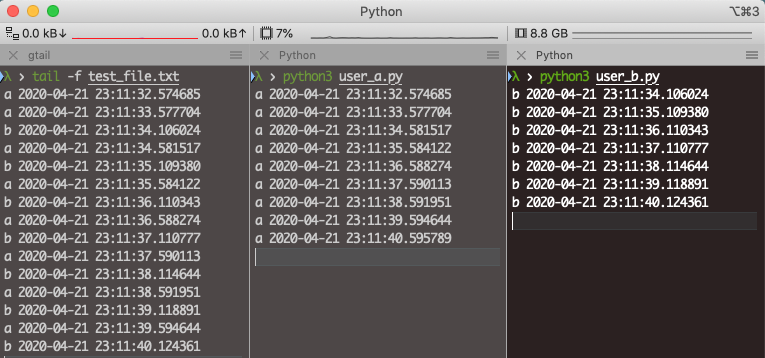
txt file.
Get notified & read regularly 👇